Wednesday, December 11, 2013

How to network your Home Security DVR

Since most businesses and many households have local area networks (LANs), you will find the task of connecting a security DVR to a LAN is a common procedure. While it is a relatively simple thing for most security equipment installers, it is complex enough to confuse many users, especially users who have never worked with IP numbers before or have never worked with LAN topology.
Let's begin by identifying your LAN topology. To do this, locate your 1) security DVR, 2) the router attached to your security DVR and 3) a computer/workstation that is attached to the same router. It can also help if you locate 4) the modem  (or router AND modem)  that connects to the internet outside your home or facility - it is usually the first piece of hardware attached to the internet cable the comes through the wall. If you don't have #3 (computer attached to the same router shared by your security DVR), create one now and verify that the PC/workstation has a working connection. If you can't find or locate #4 (modem that provides connection to the internet) don't worry about it at this point since locating it may not be necessary.
Some typical network topologies are shown below. Figure #1 represents a simple network topology you might find in small business, while figure #2 represents a very simple network you would find in many homes. (Figure #2 actually represents the bare minimum hardware & connections you need for remote DVR monitoring/programming.)

Make sure (verify) your network connection is active and your PC can connect to the internet without any problems. Start at your PC and do the following:
1. Go to the COMMAND PROMPT. Different Windows versions have different ways of getting a COMMAND PROMPT. Most Windows versions let you reach a command prompt by going to START, then RUN, then type CMD into the window and hit ENTER. If you need help go to www.windows.com or use any search engine to research your OS version command prompt. If successful you'll see a screen similar to Figure 3.

Figure 3
2.  Figure 3 shows a computer screen with the command prompt, and the PROGRAM FILES folder is open. That location should be fine. Type IPCONFIG/ALL and hit ENTER.  You should see a display screen similar to Figure 4.
( If you DON'T see Figure 4, they you are probably getting an error message. You'll need to find the person who installed your OS and find out why it doesn't have essential DOS files - you won't be able to continue this procedure without them.)
IPCONFIG is a standard Microsoft DOS command. You can read all about it at the official Microsoft website (http://technet.microsoft.com/en-us/library/bb490921.aspx), if you want. When you use this command as described here, it will report the computer's IP numbers so you can record them for your records. It does NOT change any settings or perform any kind of configuration process.
3. Write down the IP numbers shown under IP ADDRESS (192.168.1.100), SUBNET MASK (255.255.255.0), GATEWAY (192.168.1.1) and DNS SERVERS (206.222.98.82, 216.199.46.11, 206.222.98.82 - this particular computer has 3 DNS SERVER connections) and label them.

Figure 4
NOTE: Some versions of MS Windows will display IPv4 ADDRESS and an IPv6 ADDRESS - you want to use the IPv4 ADDRESS numbers.
4. Now get the IP Address of the security DVR. Got to the VRR andaccesssthe programing menu and get to the NETWORK settings area. Find the option that says DHCP (Dynamic Host Configuration Protocol) and ENABLE it..
5. Still at the DVR, write down the IP addresses it shows in the DHCP screen. Now turn OFF DHCP (or DISABLE it). If the IP addresses shown did not change, go to the next step. IF THEY DID CHANGE, re-enter them in the fields shown (DO NOT enable, or turn on, DHCP again).). If the IP addresses shown did not change, go to the next step. IF THEY DID CHANGE, re-enter them in the fields shown (DO NOT enable, or turn on, DHCP again).
6. Note the PORT NUMBERS shown in the DVR NETWORK screen. Write them down.
7. Test your configuration. Do the following at the PC/workstation that shares the same router as your DVR:
  • Get to the COMMAND PROMPT.
  • Type PING [IP Address], hit ENTER. (In our example the IP address is 192.168.1.100)
  • If you get a REPLY message, it communicated. If not, and you got a TIME OUT message of any kind then check your settings.
8. Your DVR has CLIENT SOFTWARE or REMOTE VIEWING SOFTWARE that was included in the box. Locate it and install it on the PC/workstation.
  • If your DVR has a webserver you can use IE Browser to communicate with the DVR - just type in the DVR IP Address in the URL bar of the browser.

Port Forwarding & Accessing Your DVR from Outside Your Network

To set up external (remote) viewing of your DVR and attached cameras, you will need to access your router. Refer to the router's User Manual to learn how to set port forwarding. If you can't find it, look here http://www.portforward.com/english/routers/port_forwarding/routerindex.htm. All routers have a different method of setting up port forwarding so it's impossible to instruct you here.
Program the router so that when it gets an internet request for the IP ADDRESS of the DVR it will refer (or activate) to the PORT NUMBER of the DVR (you wrote these numbers down earlier, right?). Normally most routers have a field for each physical connection and it will be obvious where to place the IP and PORT NUMBER information. If you can't find how to access your router, look at the router closely and make sure it is indeed a router and NOT a switcher. It should be ok if it's labeled ROUTER/SWITCHER but if it is an older piece of hardware and just says SWITCHER, discard it and get a true ROUTER.
Test the connection from an network external location. If the IP numbers and Port Forwarding numbers are set correctly you should be able to receive streaming video.

Using IE Browser VS Client/Remote Viewing Software

If the DVR has a webserver, then you can use IE Browser to connect to the DVR. Put the DVR IP address in the URL bar of the browser (like http://192.168.100.200, etc).
If the DVR does NOT have a webserver, then you will need to install the client/remote viewing software (that came with the DVR) on the PC/workstation you are using to view your security installation. The Client Software (or Remote Viewing Software) gives you additional features, such as ability to program motion detection, etc., that the IE Browser can not provide. Since each surveillance DVR has it's own client software, you'll have to refer to the software manual for help using their software.

Tuesday, December 10, 2013

5 Ways to detect if someone has put Spyware on your Cell Phone

Do you know that in a couple minutes, someone can install spy phone software on your mobile phone
that may enable them to take full control over your cell phone? Yes, this isn't sci-fi, or make believe James Bond picture sorcery. One of the most important threats at this time to cell phones is the danger of cell spy software. The ability of these programs is astonishing.Spy software can give somebody access to all of your text mesages, call history, email, GPS location, and even give them the power to anonymously listen in on your live cell chats. The good news though is that cell spy software can be easily removed if done right, so if you believe you have spy phone software installed on your mobile phone , you should take your mobile phone to where you purchased it at and have them reformat it. This is the sole way to truly remove it. So how does one know if somebody has installed spy phone software on your cell phone?

Here are the top 5 signs:

1) Am I able to Borrow Your Phone? Somebody has latterly asked to borrow your mobile to make a
quick call or to quickly download a ring tone or something similar like a game. 99.9% of all spy software requires a person to get physical access to the mobile phone in order to install the spy phone software.

2) Where Is My Charger? Is your battery life-span all of a sudden a lot shorter than the usual quantity of hours? Depending on the kind of cell spyware, your cell might experience a substantial quantity of unusual battery drain.


3) Receipt Please! Your text bill has latterly increased and you don't remember sending so many text messages. Another sign is that you notice a unusual increase in GPS activity and/or charges on your bill.

4) Strange Flashes. Your mobile 'lights up' for no reason but does not ring. Some types of cell spy software have remote monitoring features and when anyone attempts to call your cell phone to observe you, the spy software sometimes can't stop the cell phone from showing that a call is coming in.

5) Weird Sounds? When spy software is installed that has a live call interception feature (commonly found on BlackBerry spy software , your cell phone will sometimes make a noise when you are chatting on it.

As you have just read, spy phone software has come a long ways and it is a lot stronger than folks think. The good news is that there are methods to detect spy software and ultimately remove it. Which means that as long as you are careful, there is nothing to worry about. I would also highly counsel that you check out Spy Phone Software Forums, which is the #1 resource for spy phone info on the internet. This is n fantastic place to download free that will detect spy phone software. In addition there are a ton of other useful spy phone software resources.

Monday, December 9, 2013

How to Prove the Infidelity of a Cheating Spouse

It's a sad fact but today more and more marriages are ending in divorce. This can be due to problems at home or even financial issues. A growing percentage of these cases are becoming due to cheating and infidelity from one spouse or another.
 
1.If you can prove that your spouse was cheating and ultimately was guilty of infidelity then this will prove to be a good weapon in the divorce discussions. The first step is to sit down and figure out all the possible ways that you can prove or help to show how and when this all went down.
 
2. The number one way in our technologically advanced world to prove cheating and infidelity is by phone and text records. If you can prove that the individual had been frequently calling another person then this will help your case. This is something that you can actually bring into a courtroom as well.

3.If this isn't an option then perhaps checking the person's online browsing history could work. Check and see if they had visited any chatrooms or dating sites. More and more people are using social sites like MySpace and Facebook as engines to find sex partners. This is another good way to catch your spouse's cheating and infidelity.

4. If those options fail then you could always hire a private investigator to research the issue or place a GPS tracker on the spouses vehicle. These people are usually professionals for a reason and it's because they are good at way they do which is dig up dirt on people. If the person is indeed guilty of cheating and infidelity then these guys will find out.


Friday, December 6, 2013

How to Detect If Someone Put a GPS Tracking Device on My Car?

If you're like many people, you may be wondering how to detect if someone has placed a GPS tracking device on your vehicle. GPS Tracking devices have gotten so small, they are commonly the size of a pack of cigarettes, and some are even as small as a quarter! With devices that small, they can be hard to detect, especially if you've got a large vehicle.
The first thing you need to know is that there are two different types GPS tracking devices:
GPS "Loggers"
A GPS Logger is a passive device, meaning that it doesn't actively transmit your GPS location. This means whoever put a GPS logger on your car will have to place it on your car, and then retrieve it later in order to view the driving data, which is stored on the device. A popular example of this is the Sleuthgear iTrail GPS Logger, which is only 1.5"X1.5" big.
GPS "Trackers"
A GPS Tracker is an active device, meaning that it actively transmits your location "live", usually to a secure website, where the person who placed it there can view your location and driving information via a web browser or special program. Once they put it on there, they do not have to retrieve it, they can just view the information online. They will likely come back later though, because the battery life on active tracker is usually less than 30 days.
Here's where knowing the difference between the two types of tracking devices is important. A GPS Logger (like the iTrail GPS) can only be detected manually - meaning you'll have to physically search for it. The reason for this is because since they don't actively transmit a signal (they just store data to the device), then a bug detector or bug sweeper won't be able to pick up any kind of transmission or signal. If you suspect that you might have a GPS logger on your vehicle, the first place to look for it is UNDER THE VEHICLE. This is the most popular place to hide a GPS tracking device, and is accomplished by placing the device inside a magnetic case, which securely attaches to the metal on the underside of your vehicle. Other places to look are in the glove box, center console, and the truck (including under the spare tire).
If you suspect that you might have an active GPS Tracker on your car, a manual search is always the first step. Look under the vehicle, in the glove box, and in the trunk. These type of units are usually bigger than GPS Loggers because they need a bigger battery in order to actively transmit a signal. If you don't have time to do a manual search, you're in luck, because active GPS Trackers can be easily detected by a GPS Detector.
A GPS Detector is a handheld device that is usually battery powered that allows you to "sweep" your vehicle (or wherever else you want to locate a GPS Tracker) and will alert you when it detects a transmitting GPS signal that is sending out your location. There is an adjustable sensitivity knob that allows you to hone in on the exact location of the tracker, so you can remove it from your vehicle.
A GPS detection device will also detect cell phone signals, because cell phones are commonly used as makeshift GPS tracking devices, since owners of cell phones can often use a "locate" feature of their phone to find out where it is at.
So if you want to find out if someone has placed a GPS tracking device on your car, first conduct a manual search, and for a quicker and easier search, use a GPS Detector.

Wednesday, December 4, 2013

16 Signs Your Child May Be Taking Drugs

Here is a list of problems that could indicate drug use. Be careful not to automatically assume, however, that drugs are the problem. Children, especially adolescents, give off many of these signals when they are distressed in other ways, too. You'll need to sort out with your child exactly what the problem is and try to identify any substance abuse, perhaps with the help of a family counselor or child psychologist. Keep in mind that even if there is no drug abuse going on yet, these other problems need to be addressed.

1. Increased truancy and tardiness to classes

2. A drop in grades

3. Behavior problems in school

4. Losing interest in activities the child once enjoyed

5. Dropping old friends and a sudden influence of a new crowd

6. Personality changes -- a child who was once outgoing is now withdrawn, or someone who is usually relaxed is now fidgety much of the time

7. Sudden mood changes -- euphoria followed by tenseness or edginess; excessive suspiciousness or paranoia

8. Appearing listless or hung over

9. Increased forgetfulness

10. Increased secretiveness

11. Withdrawal from the family

12. More combativeness at home

13. Red eyes

14. Weight loss

15. Not sleeping well

16. Fatigue or hyperactivity

Tuesday, December 3, 2013

The top 9 Signs your spouse may be cheating on you

You have a sinking feeling in the pit of your stomach, something is not right but you can't quite figure out what that feeling is about. Your spouse has become distant, he/she is working late on a regular basis or, maybe your spouse has moved out of the house with no explanation. You suspect your spouse is cheating but every time you bring it up with your spouse, he/she denies the possibility. All the signs are there but you don't have any proof. So, pay attention to the signs and your instinct but, be careful not to confuse signs with proof.

1. "I Love You But I'm Not In Love With You."

If you hear these words, a big warning bell should go off. This is one of the most consistent things a cheating spouse will say. Your spouse may have a deep, loving bond with you but, intense feelings of passion can override the bond with you and cause your spouse to lose sight of his/her true feelings. The cheating spouse will develop what I call hormone - induced amnesia. The surging hormones and passion they feel in their new relationship can cause some very skewed thinking.

2. "We are just friends."

This is also another very predictable statement that will come from a cheating spouse. If your spouse is spending more and more time with this new "friend"; then there is probably more to it than mere friendship. Your spouse may feel they have a lot in common with this person, that this person understands them and things they are going through. Whatever the reasons for the friendship, it's a big warning sign and one you should take seriously.

3. A sudden need for privacy.

If things the two of you used to share openly suddenly become private pay attention cause something is probably up. He/she may start password protecting computer activity. Cell phone and credit card bills may be hidden. If you ask why or attempt to find out information that used to be common knowledge between the two of you, you will be accused of snooping or trying to control your spouse. Big warning sign!

4. "I need some space to figure out my feelings."

Men and women who are involved with someone else will request more space, time alone or away from the family. They may say it is due to confusion over their feelings or stress at work. This can be a sign that there is someone else and the spouse is trying to figure out ways to have more freedom.

5. Regular work habits change.

Working late, going to work at odd hours or, putting in more time than is normal on work related issues can be an indication that a spouse is cheating.

6. Spending a large amount of time on the computer.

In today’s world, with modern technology, a person looking for an affair doesn’t even have to leave their home. The ease of internet chat rooms, online dating sites and secret email accounts has caused an alarming increase in emotional affairs. If your spouse is online more than usual, hanging out in chat rooms and visiting pornographic websites then you have reason to be alarmed.

7. Secretive phone calls and more time spent on the phone.

Emotional affairs occur primarily via the phone, especially cell phones. If you find your spouse hanging up suddenly when you enter the room or erasing the history on the cell phone and becoming defensive when asked about it, then you might want to check your phone records.

8. Behavior that just doesn't add up.

Not being where he/she was expected to be. Missing time they can't explain. Money that isn't accounted for. Receipts for things you don't have. Missing clothing. Clothing that does not belong to your family. Being caught in little lies about the details of the day.

9. Your Own fears and suspicions

If you find yourself looking for excuses for your spouse's behavior or trying to convince yourself that they would never cheat then that is a warning sign. Your intuition is frequently one of the best indicators that something is wrong. If you suspect your spouse might be cheating on you, do some investigating and then talk to him/her about what you've found. Do it in a way that is calm and courteous. Ask for honesty. Be prepared for lies. It is a sad fact that people having affairs become excellent liars. People who never told a lie before in their lives. Trust your gut instinct but get hard, cold proof also.

Monday, December 2, 2013

Law Enforcement Grade Cameras


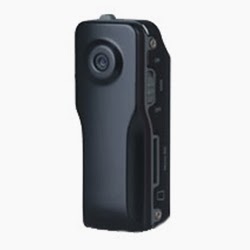
This Mini DV features a higher frame rate (30fps), higher storage capacity (16GB), and now has a TIME/DATE stamp. It also has a unique metal housing in a ultra small design. 

It can be used in many recording situations such as network video, family entertainment, business meetings, outdoor sports, personal and home security evidence collection for the novice and professional.

Packed inside this small rugged DVR is a color camera with 640x480 resolution @ 30 fps. Great high quality video. With a built in rechargeable battery and the capacity to use up to an 16GB micro SD card this Micro Mini DVR is both versatile and small enough to carry anywhere! Includes 2GB SD Card.
 
Specifications:
Thumb size alloy housing
Time/Date Stamping
Web cam capability
Supports AVI video format
30 FPS and 640 x 480 Resolution
Built in Li-on rechargeable battery last up to 1.5 hours
Supports up to 16GB Micro SD Card (30 minutes per 1 GB of recording time)
LED indicator
Easy installation with a bracket or clip
Bracket allows for 360 degree pan and 150 degree tilt

Includes:

Mini DVR unit
USB  Cable
Mounts, clip or Rotating bracket
Carrying Case
Neck strap
Install Mini-CD
Instructions